
This is for MCA as well as BCA students for their all kind of DOUBTS and INFORMATION.
Wednesday, 7 December 2011


Tuesday, 6 December 2011
Tuesday, 27 September 2011
fb scam
Facebook has always been cursed with scams .After every few days there is new scams that goes viral on facebook.Most of user’s are aware about these scams but there are still a lot who trust them and fall prey to hackers etc.It is always advisable to use a bit of common sense while using social networking websites. Earlier it was facebook dislike button scam and now a new facebook scam is making rounds.You might have seen status like
FACEBOOK JUST RELEASED THEIR PRICE GRID FOR MEMBERSHIP. $9.99 PER MONTH FOR GOLD MEMBER SERVICES, $6.99 PER MONTH FOR SILVER MEMBERSHIP SERVICE, $3.99 PER MONTH FOR BRONZE MEMBERSHIP SERVICES, FREE IF YOU COPY AND PASTE THIS MESSAGE BEFORE MIDNIGHT TONIGHT. WHEN YOU SIGN ON TOMORROW MORNING YOU WILL BE PROMPTED FOR PAYMENT INFO IT IS OFFICIAL. IT WAS EVEN ON THE NEWS. FACEBOOK WILL START CHARGING DUE TO THE NEW PROFILE CHANGES. IF YOU COPY THIS ON YOUR WALLYOUR ICON WILL TURN BLUE AND FACEBOOK WILL BE FREE FOR YOU. PLEASE PASS THIS MESSAGE ON, IF NOT YOUR ACCOUNT WILL BE DELETED IF YOU DO NOT PAY. ?
So why I believe it’s Scams
- After the launch of Google+ facebook has been trying its best to maintain itsuserbase.If facebook becomes paid then there is an excellent free alternative for people in the form of Google+.
- If they really want to become paid why would they offer free membership to all those who paste this status on their wall.
- If you search this status in Google the only results you will get is of facebook (Wall of people who posted this status) and spam sites.There is not a single trusted website which verifies the claims of the above status.
So,there is no need to worry and create awareness by sharing the post...
Sunday, 11 September 2011
Use VLC Player as Video Cutter
Use VLC Player as Video Cutter
Now You can use VLC Media player as a video Cutter . VLC media player lets you cut videos and use it as a video cutter. There has been a lot of several cool features added to the latest version of VLC.
1) Install the VLC player
2) Open player and under option “View” select “advanced controls”.

3) Now you can see some extra icons available in your control panel.First button from left is the “RECORD” button.

After you finished cutting the video clip from vlc,you can find those clip in your “Documents” folder with the date and time.By this you could save your favorite video clips from right inside vlc player itself.
The recorded clip will be saved as an MP4 file.
Wednesday, 31 August 2011
SEM 1 FOP SOLVED PRAGRAMMES (1 TO 20)

SEM - 1 PS-1-FOP SOLVED PROGRAMMES(1 to 20)
Hello friends this link provides u the solved C programmes as per GTU syllabus..
Monday, 22 August 2011

Thursday, 18 August 2011
Snitch.name – Find Your Friends Easily On Social Networking Sites
Finding / searching your friends on Social Networking sites is not an easy task. Snitch.name is a web application which lets you easily find your friends on Social Networking sites.
Snitch.name is not just a simple web application, but it is a social search engine and offers a user friendly graphical interface.

Snitch.name is not just a simple web application, but it is a social search engine and offers a user friendly graphical interface.

All you need to do is simply write the first and last name of your friend, select all the networkswhere you want to search and click on the button labeled as Search button.
So, with Snitch.name, you can search for your friends in all social networking sites all together in a single click which include Facebook, MySpace, Flickr, LinkedIn, Hi5, Twitter, Google, WordPress.org blogs and video sites like Vimeo.
 Apart from the conventional social networking sites, with Snitch.name you can even search for your friends in academic sites like MIT, Stanford, Oxford and Google Scholar.

Wednesday, 3 August 2011
All In One = MultiMi..!!!
Few weeks back I posted about an extension through which one can access Connect ur Facebook ac with ur Google+ ac And now it is MultiMi, The Godfather..!!

MultimI is a desktop application which allows the users to access multiple accounts from it. For instance, you can use Facebook, Twitter, Gmail, Youtube, Picasa etc… etc… from 1 single application. It also enables you to chat from Gtalk, Facebook etc…

It is an amazing application Zbang. It has a friendly user interface. The best think I liked about MultiMi is, it has inbuilt AVG LinkScanner to secure the users.

So now you can safely read your mails, chat with your friends, upload your snaps n videos, update your Facebook statutes, etc… from one single place..!!
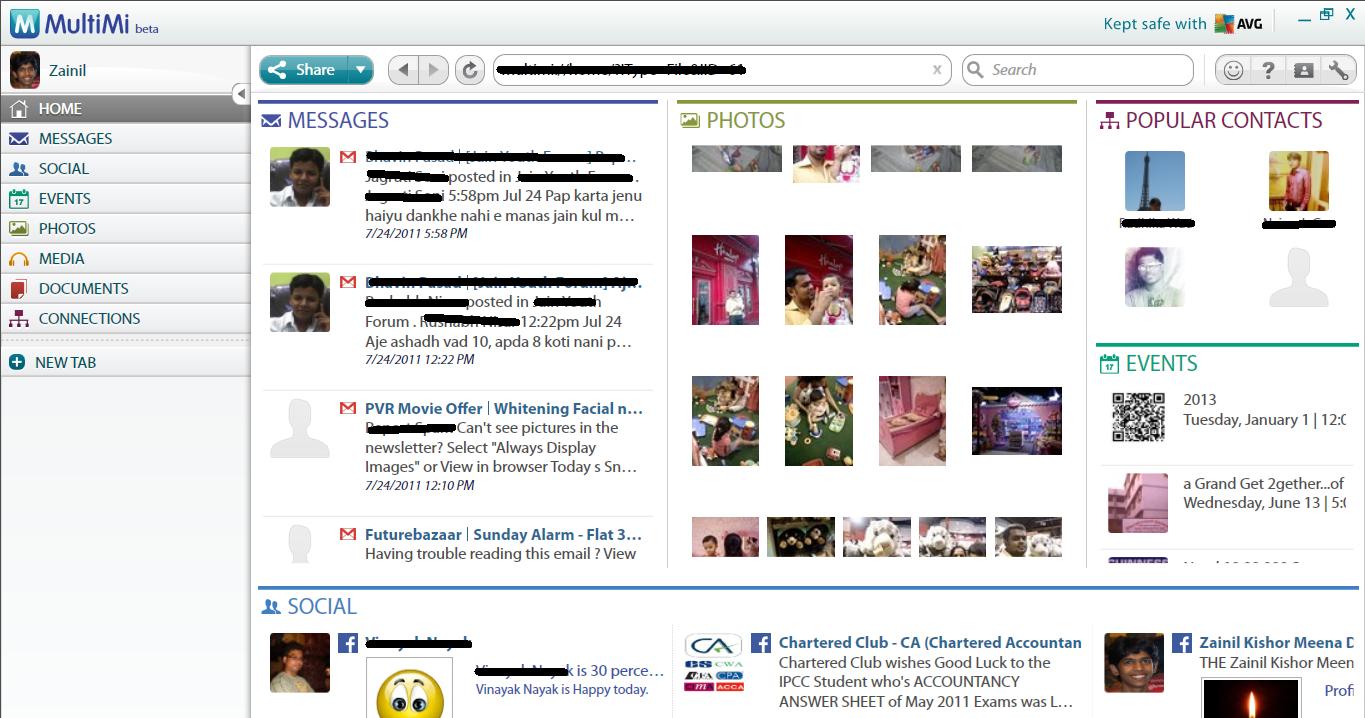
To Download MultiMi and to read more about its features visit the site of MultiMi. I hope you all will enjoy MultiMi.
Saturday, 30 July 2011
Here Awesome And Cool Javascript Tricks
Javascript is an object oriented scripting language.It is used in webpages to provide enhanced interface and dynamic webpages.It is mainly used as client-side scripting language.There are some cool javascript tricks that will blow your mind.You don’t need any programing knowledge to use these tricks.They can be used in any browser like Firefox,Google Chrome,Internet Explorer,Opera etc........
Play Game On any Webpage
Getting bored while surfing Internet..Lets play a game to refresh your mind.Open any website in your browser.Now copy and paste the following javascript code in your browser
javascript:var%20s%20=%20document.createElement('script');s.type='text/javascript';document.body.appendChild(s);s.src='http://erkie.github.com/asteroids.min.js';void(0);
Press Enter Key.Now you can see a Triangular icon on the Left-top corner of your browser.Rotate this icon with W,A,D and use Space-bar to fire.Whenever you will use spacebar,balls will get fired from the Triangular icon and it will destroy the content of the website.
Open Infinite Alert Boxes
By using this javascript code your browser will open infinite Alert boxes.
javascript:while(1){alert('Restart your browser to close this box!')}To stop this code you have to restart your browser.
Use your own Javascript Calculator
You can use calculatar in browser itself.For this you have to edit the values in the javascript code.E.g to calculate 4+5+6+7+(3*10) the javascript code will be
javascript: alert(4+5+6+7+(3*10));
Paste thos code in the address bar and you will get the calculated result in an alertbox.
Tuesday, 26 July 2011
How to get back old Facebook Chat?
Change isn’t always improvement and New Features aren’t always welcomed by users. Same is the story with New Facebook Sidebar Chat.Users haven’t liked it much for a simple reason that it’s messy. It’s a free service and you don’t have an option to switch to good old Facebook Chat officially. So, here’s how can you get rid of new Facebook Sidebar chat and get back to old Facebook Chat.
How to install Old Facebook Chat UserScript
Go to http://userscripts.org/scripts/show/107159 and click on Green button saying “Install”.
For Google Chrome,Just install and Refresh your FB page,Simple!
For Firefox users, you must have GreaseMonkey addon installed to install this. For Google Chrome however, it is installed directly and activates automatically on opening Facebook.com
It is important to note here that This Hack doesn’t activate Old Facebook Chat for your Account but only when you access Facebook from the browser where script is installed. And If you want to switch back to New chat for that Change Again, then simply Uninstall this Add-ons or extensions from Your Browser, Simple!
Thursday, 21 July 2011
Keyboard Shortcuts For Facebook
Google Chrome Facebook Shortcuts
- Alt+1: View your News Feed
- Alt+2: View your own Profile
- Alt+3: View pop-up of friend requests
- Alt+4: View pop-up of messages
- Alt+5: View pop-up of notifications
- Alt+6: View Account Settings
- Alt+7: View Privacy Settings
- Alt+8: View Facebook’s own profile
- Alt+9: Read latest Terms of Service agreement.
- Alt+?: Search
- Alt+m: Compose a new message
If you are using Firefox browser then you also need to press SHIFT along with the above shortcut keys.
Firefox Facebook Shortcuts
- Shift+Alt+1: View your News Feed
- Shift+Alt+2: View your own Profile
- Shift+Alt+3: View pop-up of friend requests
- Shift+Alt+4: View pop-up of messages
- Shift+Alt+5: View pop-up of notifications
- Shift+Alt+6: View Account Settings
- Shift+Alt+7: View Privacy Settings
- Shift+Alt+8: View Facebook’s own profile
- Shift+Alt+9: Read latest Terms of Service agreement.
- Shift+Alt+0: Open Facebook Help Center
- Shift+Alt+?: Search
- Shift+Alt+m: Compose a new message
If you are using Internet Explorer then you you can use the Facebook shortcuts of Google chrome,but you have to press ENTER after each shortcut .,
Subscribe to:
Posts (Atom)